> ## Documentation Index
> Fetch the complete documentation index at: https://nova.laravel.com/docs/llms.txt
> Use this file to discover all available pages before exploring further.
# Field Panels
If your resource contains many fields, your resource "detail" page can become crowded. For that reason, you may choose to break up groups of fields into their own "panels":
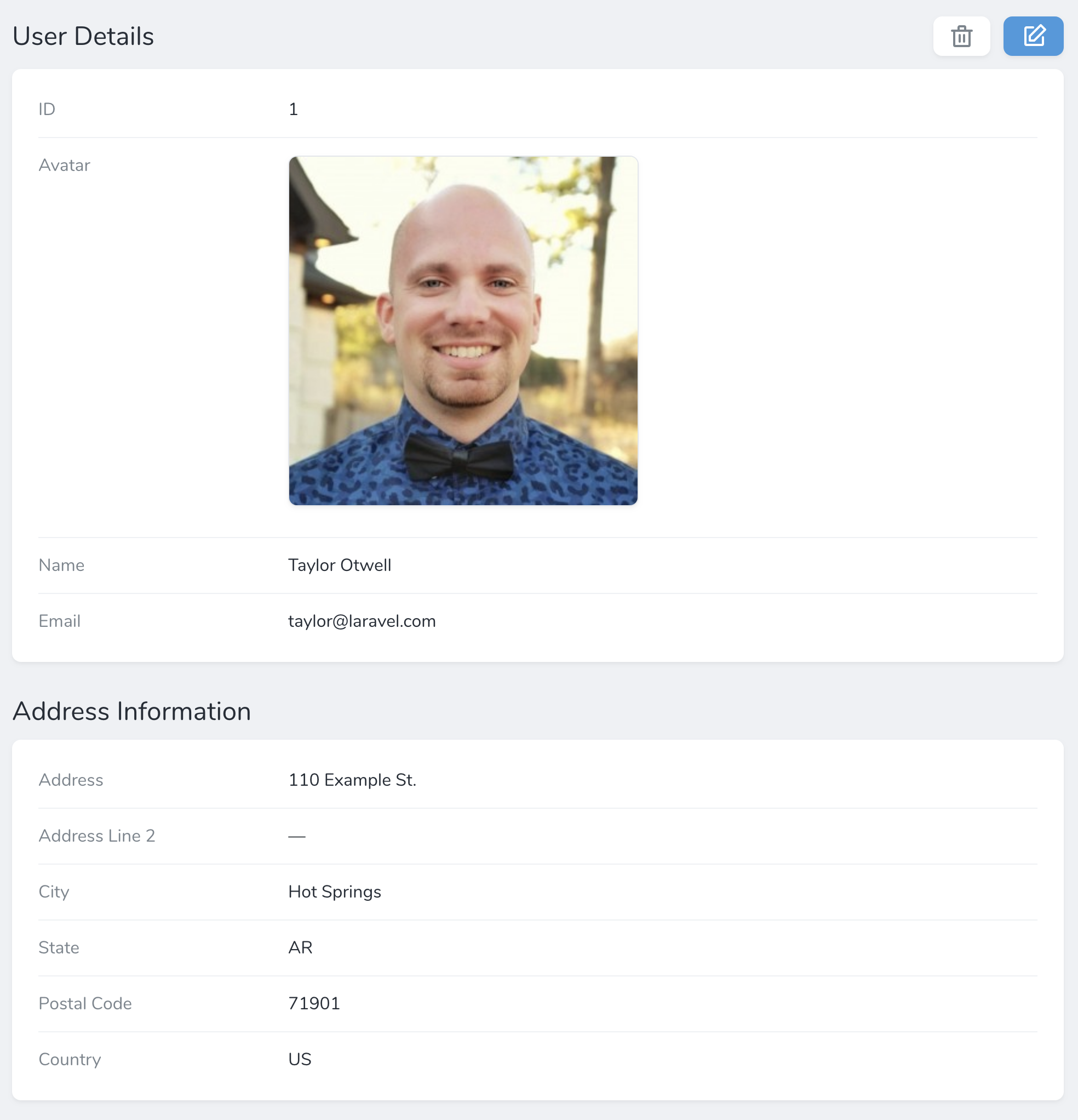 You may accomplish this by creating a new `Panel` instance within the `fields` method of a resource. Each panel requires a name and an array of fields that belong to that panel:
```php app/Nova/~Resource.php {1,18-22} theme={null}
use Laravel\Nova\Panel;
use Laravel\Nova\Fields\Date;
use Laravel\Nova\Fields\ID;
use Laravel\Nova\Fields\Text;
use Laravel\Nova\Http\Requests\NovaRequest;
// ...
/**
* Get the fields displayed by the resource.
*
* @return array
*/
public function fields(NovaRequest $request): array
return [
ID::make()->sortable(),
Panel::make('Profile', [
Text::make('Full Name'),
Date::make('Date of Birth'),
Text::make('Place of Birth'),
]),
];
}
```
### Limiting Displayed Fields
You may limit the amount of fields shown in a panel by default using the `limit` method:
```php {9} theme={null}
use Laravel\Nova\Panel;
// ...
Panel::make('Profile', [
Text::make('Full Name'),
Date::make('Date of Birth'),
Text::make('Place of Birth'),
])->limit(1),
```
Panels with a defined field limit will display a **Show All Fields** button in order to allow the user to view all of the defined fields when needed.
### Collapsible Panels
You may allow field panels to be collapsible by invoking the `collapsible` method when defining the panel. This method utilizes JavaScript's `localStorage` feature to remember the current state of the panel between requests:
```php {9} theme={null}
use Laravel\Nova\Panel;
// ...
Panel::make('Profile', [
Text::make('Full Name'),
Date::make('Date of Birth'),
Text::make('Place of Birth'),
])->collapsible(),
```
You may indicate that a panel should always be collapsed by default via the `collapsedByDefault` method:
```php {9} theme={null}
use Laravel\Nova\Panel;
// ...
Panel::make('Profile', [
Text::make('Full Name'),
Date::make('Date of Birth'),
Text::make('Place of Birth'),
])->collapsedByDefault(),
```
## Tabs
The `Tab` panel allows you to organize resource fields and relationships within tab panels:
You may accomplish this by creating a new `Panel` instance within the `fields` method of a resource. Each panel requires a name and an array of fields that belong to that panel:
```php app/Nova/~Resource.php {1,18-22} theme={null}
use Laravel\Nova\Panel;
use Laravel\Nova\Fields\Date;
use Laravel\Nova\Fields\ID;
use Laravel\Nova\Fields\Text;
use Laravel\Nova\Http\Requests\NovaRequest;
// ...
/**
* Get the fields displayed by the resource.
*
* @return array
*/
public function fields(NovaRequest $request): array
return [
ID::make()->sortable(),
Panel::make('Profile', [
Text::make('Full Name'),
Date::make('Date of Birth'),
Text::make('Place of Birth'),
]),
];
}
```
### Limiting Displayed Fields
You may limit the amount of fields shown in a panel by default using the `limit` method:
```php {9} theme={null}
use Laravel\Nova\Panel;
// ...
Panel::make('Profile', [
Text::make('Full Name'),
Date::make('Date of Birth'),
Text::make('Place of Birth'),
])->limit(1),
```
Panels with a defined field limit will display a **Show All Fields** button in order to allow the user to view all of the defined fields when needed.
### Collapsible Panels
You may allow field panels to be collapsible by invoking the `collapsible` method when defining the panel. This method utilizes JavaScript's `localStorage` feature to remember the current state of the panel between requests:
```php {9} theme={null}
use Laravel\Nova\Panel;
// ...
Panel::make('Profile', [
Text::make('Full Name'),
Date::make('Date of Birth'),
Text::make('Place of Birth'),
])->collapsible(),
```
You may indicate that a panel should always be collapsed by default via the `collapsedByDefault` method:
```php {9} theme={null}
use Laravel\Nova\Panel;
// ...
Panel::make('Profile', [
Text::make('Full Name'),
Date::make('Date of Birth'),
Text::make('Place of Birth'),
])->collapsedByDefault(),
```
## Tabs
The `Tab` panel allows you to organize resource fields and relationships within tab panels:
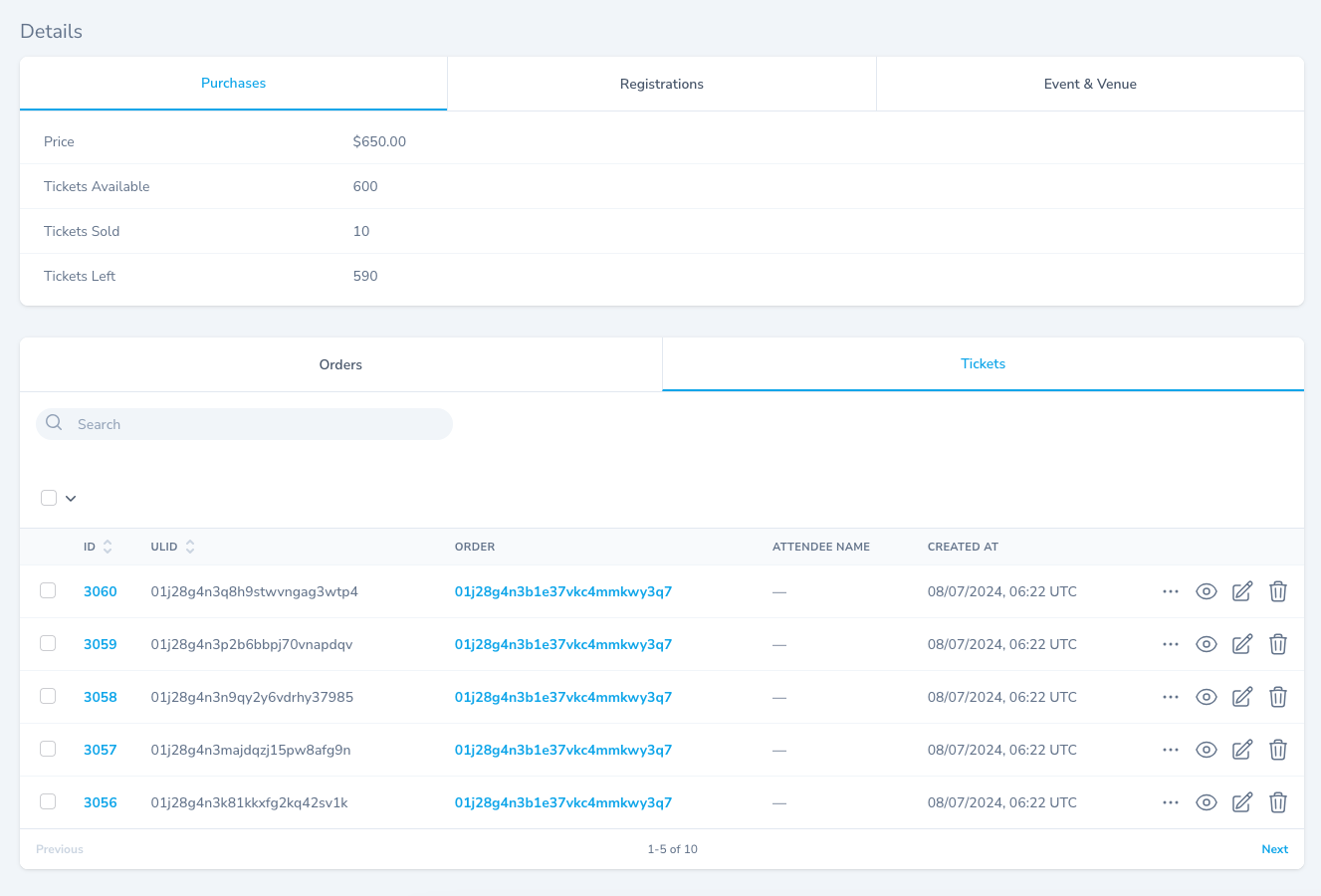 To create a tab panel when defining your resource's fields, provide the tab group title and array of tabs to the `Tab::group` method. Each individual tab may be constructed using `Tab::make` and receives a tab title and array of fields:
```php app/Nova/Event.php {5,23-42} theme={null}
use Laravel\Nova\Fields\Currency;
use Laravel\Nova\Fields\HasMany;
use Laravel\Nova\Fields\HasManyThrough;
use Laravel\Nova\Fields\Hidden;
use Laravel\Nova\Fields\ID;
use Laravel\Nova\Http\Requests\NovaRequest;
use Laravel\Nova\Tabs\Tab;
// ...
/**
* Get the fields displayed by the resource.
*
* @return array
*/
public function fields(NovaRequest $request): array
{
return [
ID::make()->sortable(),
// ...
Tab::group('Details', [
Tab::make('Purchases', [
Currency::make('Price')->asMinorUnits(),
Number::make('Tickets Available'),
Number::make('Tickets Sold'),
]),
Tab::make('Registrations', [
// ...
]),
Tab::make('Event & Venue', [
// ...
]),
]),
Tab::group('Relations', [
HasMany::make('Orders'),
HasManyThrough::make('Tickets'),
]),
]
}
```
### Omitting Tab Group Titles
Tab group titles may be omitted by simply providing `fields` to the `Tab::group` method:
```php theme={null}
use Laravel\Nova\Tabs\Tab;
// ...
Tab::group(fields: [
HasMany::make('Orders'),
HasManyThrough::make('Tickets'),
]),
```
To create a tab panel when defining your resource's fields, provide the tab group title and array of tabs to the `Tab::group` method. Each individual tab may be constructed using `Tab::make` and receives a tab title and array of fields:
```php app/Nova/Event.php {5,23-42} theme={null}
use Laravel\Nova\Fields\Currency;
use Laravel\Nova\Fields\HasMany;
use Laravel\Nova\Fields\HasManyThrough;
use Laravel\Nova\Fields\Hidden;
use Laravel\Nova\Fields\ID;
use Laravel\Nova\Http\Requests\NovaRequest;
use Laravel\Nova\Tabs\Tab;
// ...
/**
* Get the fields displayed by the resource.
*
* @return array
*/
public function fields(NovaRequest $request): array
{
return [
ID::make()->sortable(),
// ...
Tab::group('Details', [
Tab::make('Purchases', [
Currency::make('Price')->asMinorUnits(),
Number::make('Tickets Available'),
Number::make('Tickets Sold'),
]),
Tab::make('Registrations', [
// ...
]),
Tab::make('Event & Venue', [
// ...
]),
]),
Tab::group('Relations', [
HasMany::make('Orders'),
HasManyThrough::make('Tickets'),
]),
]
}
```
### Omitting Tab Group Titles
Tab group titles may be omitted by simply providing `fields` to the `Tab::group` method:
```php theme={null}
use Laravel\Nova\Tabs\Tab;
// ...
Tab::group(fields: [
HasMany::make('Orders'),
HasManyThrough::make('Tickets'),
]),
```