> ## Documentation Index
> Fetch the complete documentation index at: https://nova.laravel.com/docs/llms.txt
> Use this file to discover all available pages before exploring further.
# Defining Lenses
> Learn how to define lenses in Nova.
While similar to filters, Nova lenses allow you to fully customize the underlying resource Eloquent query. For example, you may want to list of all your application's users sorted by their total lifetime revenue:
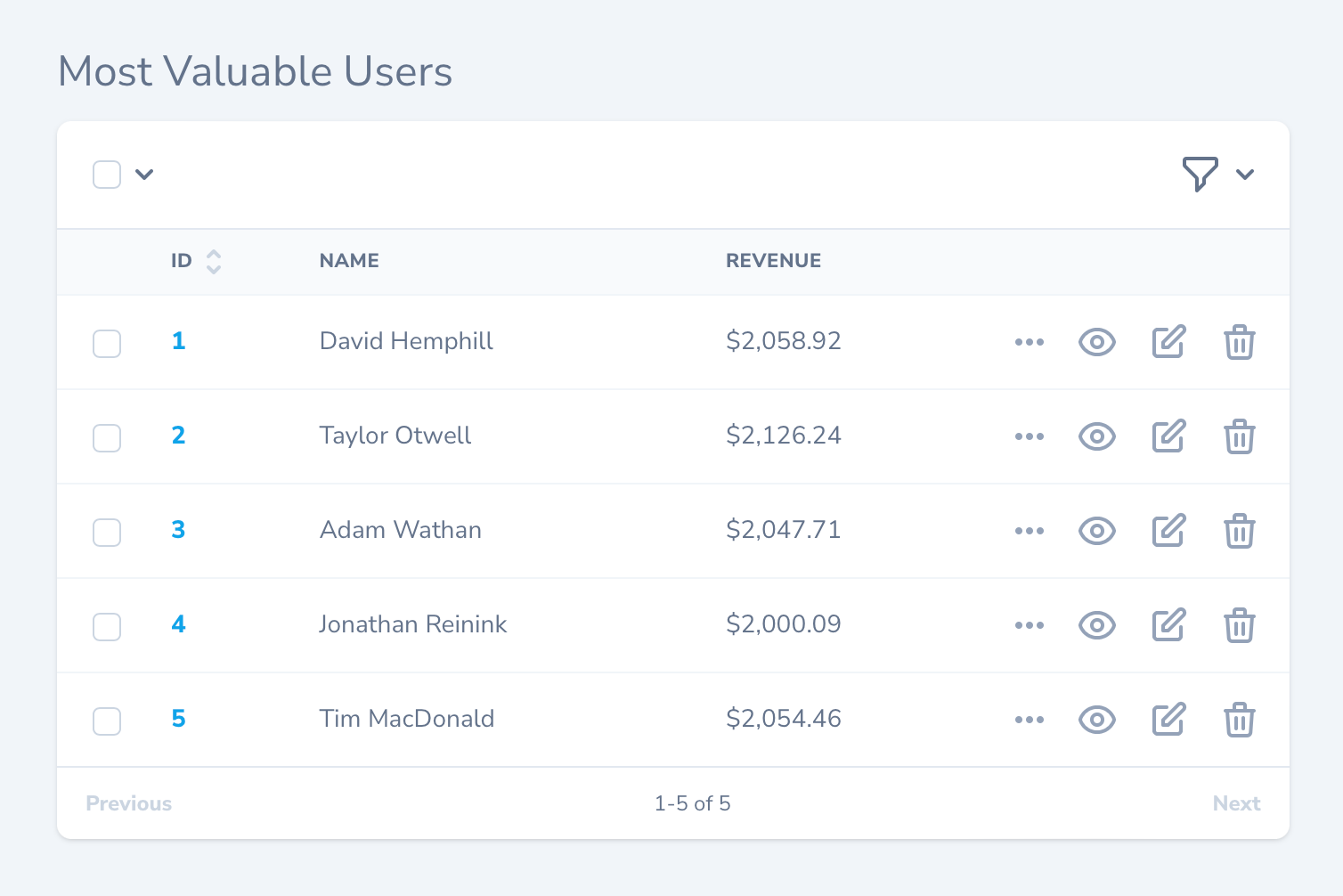 Creating such a list may require you to join to additional tables and perform aggregate functions within the query. If it sounds complicated, don't worry - this is exactly the type of situation lenses are designed to solve.
## Overview
To create a lens, you may use the `nova:lens` Artisan command. By default, Nova will place newly generated lenses in the `app/Nova/Lenses` directory:
```shell theme={null}
php artisan nova:lens MostValuableUsers
```
Each lens generated by Nova contains several methods. However, the two methods we are currently concerned with are the `query` and `fields` methods. The `query` method is responsible for building the Eloquent query that is needed to retrieve the desired data, while the `fields` method returns an array of fields that should be displayed when viewing the lens.
To learn more, let's take a look at a complete lens definition that displays users and their lifetime revenue. As you can see in the example below, the `query` method will take advantage of the `withFilters` and `withOrdering` methods offered by the `LensRequest` in order to instruct Nova to also apply any selected filters and ordering constraints to the query:
```php app/Nova/Lenses/MostValuableUsers.php theme={null}
namespace App\Nova\Lenses;
use Illuminate\Contracts\Database\Eloquent\Builder;
use Illuminate\Contracts\Pagination\Paginator;
use Illuminate\Support\Facades\DB;
use Laravel\Nova\Fields\ID;
use Laravel\Nova\Fields\Number;
use Laravel\Nova\Fields\Text;
use Laravel\Nova\Http\Requests\LensRequest;
use Laravel\Nova\Http\Requests\NovaRequest;
use Laravel\Nova\Lenses\Lens;
use Laravel\Nova\Nova;
class MostValuableUsers extends Lens
{
/**
* Get the query builder / paginator for the lens.
*/
public static function query(LensRequest $request, Builder $query): Builder|Paginator
{
return $request->withOrdering($request->withFilters(
$query->select(self::columns())
->join('licenses', 'users.id', '=', 'licenses.user_id')
->groupBy('users.id', 'users.name')
->withCasts([
'revenue' => 'float',
])
), fn ($query) => $query->orderBy('revenue', 'desc'));
}
/**
* Get the columns that should be selected.
*/
protected static function columns(): array
{
return [
'users.id',
'users.name',
DB::raw('sum(licenses.price) as revenue'),
];
}
/**
* Get the fields available to the lens.
*
* @return array
*/
public function fields(NovaRequest $request): array
{
return [
ID::make('ID', 'id'),
Text::make('Name', 'name'),
Number::make('Revenue', 'revenue', function ($value) {
return '$'.number_format($value, 2);
}),
];
}
/**
* Get the cards available for the lens.
*
* @return array
*/
public function cards(NovaRequest $request): array
{
return [];
}
/**
* Get the filters available for the lens.
*
* @return array
*/
public function filters(NovaRequest $request): array
{
return [];
}
/**
* Get the actions available for the lens.
*
* @return array
*/
public function actions(NovaRequest $request): array
{
return parent::actions($request);
}
/**
* Get the URI key for the lens.
*
* @return string
*/
public function uriKey()
{
return 'most-profitable-users';
}
}
```
As you can see in the example above, the `query` method has full control of the Eloquent query used to retrieve the lens data. The `fields` method may leverage any of Nova's fields in order to appropriately display the data retrieved by the query.
In this example, the `columns` method has been extracted from the `query` method for readability. It is not "required" and is not a "feature" of lenses.
When writing your lens query, you should always try to include the resource's ID as a selected column. If the ID is not included, Nova will not be able to display the "Select All Matching" option for the lens. In addition, the resource deletion menu will not be available.
#### Query Helpers
The `withOrdering` and `withFilters` methods are used to apply orderings and filters to lens queries and should always be applied in the `query` method. Both methods accept the `$query` as the first parameter, and the `withOrdering` method accepts a closure as its second parameter. The closure passed to the `withOrdering` method should apply the default ordering to the query that will be applied if no other ordering has been selected from the Nova dashboard:
```php theme={null}
use Illuminate\Contracts\Database\Eloquent\Builder;
use Illuminate\Contracts\Pagination\Paginator;
use Laravel\Nova\Http\Requests\LensRequest;
// ...
/**
* Get the query builder / paginator for the lens.
*/
public static function query(LensRequest $request, Builder $query): Builder|Paginator
{
return $request->withOrdering(
$request->withFilters($query),
fn ($query) => $query->latest()
);
}
```
## Lens Polling
Nova can automatically fetch the latest records for a lens at a specified interval via polling. To enable polling, overwrite the `polling` property of your lens class:
```php app/Nova/Lenses/MostValuableUsers.php theme={null}
/**
* Indicates whether the lens should automatically poll for new records.
*
* @var bool
*/
public static $polling = true;
```
To customize the polling interval, you may override the `pollingInterval` property on your lens class. The `pollingInterval` defines the number of seconds Nova should wait before fetching new records:
```php app/Nova/Lenses/MostValuableUsers.php theme={null}
/**
* The interval (in seconds) at which Nova should poll for new lens.
*
* @var int
*/
public static $pollingInterval = 5;
```
### Toggling Lens Polling
By default, when lens polling is enabled, there is no way to disable polling once the page has loaded. However, you can instruct Nova to display a start / stop polling toggle button by defining a `showPollingToggle` property on your lens class as `true`:
```php app/Nova/Lenses/MostValuableUsers.php theme={null}
/**
* Indicates whether to show the polling toggle button inside Nova.
*
* @var bool
*/
public static $showPollingToggle = true;
```
## Lens Filters
Each Nova lens also contains a `filters` method. This method allows you to attach any of your existing [filters](./../filters/defining-filters) to the lens:
```php app/Nova/Lenses/MostValuableUsers.php theme={null}
use App\Nova\Filters\UserType;
use Laravel\Nova\Http\Requests\NovaRequest;
// ...
/**
* Get the filters available for the lens.
*
* @return array
*/
public function filters(NovaRequest $request): array
{
return [
new UserType,
];
}
```
## Lens Actions
Each Nova lens also contains an `actions` method. This method allows you to attach any of your existing [actions](./../actions/defining-actions) to the lens:
```php app/Nova/Lenses/MostValuableUsers.php theme={null}
use App\Nova\Actions\Export;
use Laravel\Nova\Http\Requests\NovaRequest;
// ...
/**
* Get the actions available for the lens.
*
* @return array
*/
public function actions(NovaRequest $request): array
{
return [
...parent::actions($request),
new Export(),
];
}
```
By default, lenses will inherit the actions of their associated resource. However, you may override the `actions` method on the lens to define a custom set of actions that should be available to the lens.
## Lens Metrics
Each Nova lens also contains a `cards` method. This method allows you to attach any of your existing [metrics](./../metrics/defining-metrics) to the lens:
```php theme={null}
use App\Nova\Metrics\NewUsers;
use Laravel\Nova\Http\Requests\NovaRequest;
// ...
/**
* Get the cards available for the lens.
*
* @return array
*/
public function cards(NovaRequest $request): array
{
return [
new NewUsers,
];
}
```
## Lens Pagination
If you would like to customize the selectable maximum result amounts shown on each lens's "per page" filter menu, you can do so by customizing the lens's `perPageOptions` property or `perPageOptions` method. By default, Nova will fetch the number of resources equal to the first value in the `perPageOptions` array:
```php Property theme={null}
/**
* The pagination per-page options used for this lens.
*
* @return int|array|null
*/
public static $perPageOptions = [50, 100, 150];
```
```php Method theme={null}
/**
* The pagination per-page options configured for this lens.
*
* @return array
*/
public static function perPageOptions()
{
return [50, 100, 150];
}
```
Creating such a list may require you to join to additional tables and perform aggregate functions within the query. If it sounds complicated, don't worry - this is exactly the type of situation lenses are designed to solve.
## Overview
To create a lens, you may use the `nova:lens` Artisan command. By default, Nova will place newly generated lenses in the `app/Nova/Lenses` directory:
```shell theme={null}
php artisan nova:lens MostValuableUsers
```
Each lens generated by Nova contains several methods. However, the two methods we are currently concerned with are the `query` and `fields` methods. The `query` method is responsible for building the Eloquent query that is needed to retrieve the desired data, while the `fields` method returns an array of fields that should be displayed when viewing the lens.
To learn more, let's take a look at a complete lens definition that displays users and their lifetime revenue. As you can see in the example below, the `query` method will take advantage of the `withFilters` and `withOrdering` methods offered by the `LensRequest` in order to instruct Nova to also apply any selected filters and ordering constraints to the query:
```php app/Nova/Lenses/MostValuableUsers.php theme={null}
namespace App\Nova\Lenses;
use Illuminate\Contracts\Database\Eloquent\Builder;
use Illuminate\Contracts\Pagination\Paginator;
use Illuminate\Support\Facades\DB;
use Laravel\Nova\Fields\ID;
use Laravel\Nova\Fields\Number;
use Laravel\Nova\Fields\Text;
use Laravel\Nova\Http\Requests\LensRequest;
use Laravel\Nova\Http\Requests\NovaRequest;
use Laravel\Nova\Lenses\Lens;
use Laravel\Nova\Nova;
class MostValuableUsers extends Lens
{
/**
* Get the query builder / paginator for the lens.
*/
public static function query(LensRequest $request, Builder $query): Builder|Paginator
{
return $request->withOrdering($request->withFilters(
$query->select(self::columns())
->join('licenses', 'users.id', '=', 'licenses.user_id')
->groupBy('users.id', 'users.name')
->withCasts([
'revenue' => 'float',
])
), fn ($query) => $query->orderBy('revenue', 'desc'));
}
/**
* Get the columns that should be selected.
*/
protected static function columns(): array
{
return [
'users.id',
'users.name',
DB::raw('sum(licenses.price) as revenue'),
];
}
/**
* Get the fields available to the lens.
*
* @return array
*/
public function fields(NovaRequest $request): array
{
return [
ID::make('ID', 'id'),
Text::make('Name', 'name'),
Number::make('Revenue', 'revenue', function ($value) {
return '$'.number_format($value, 2);
}),
];
}
/**
* Get the cards available for the lens.
*
* @return array
*/
public function cards(NovaRequest $request): array
{
return [];
}
/**
* Get the filters available for the lens.
*
* @return array
*/
public function filters(NovaRequest $request): array
{
return [];
}
/**
* Get the actions available for the lens.
*
* @return array
*/
public function actions(NovaRequest $request): array
{
return parent::actions($request);
}
/**
* Get the URI key for the lens.
*
* @return string
*/
public function uriKey()
{
return 'most-profitable-users';
}
}
```
As you can see in the example above, the `query` method has full control of the Eloquent query used to retrieve the lens data. The `fields` method may leverage any of Nova's fields in order to appropriately display the data retrieved by the query.
In this example, the `columns` method has been extracted from the `query` method for readability. It is not "required" and is not a "feature" of lenses.
When writing your lens query, you should always try to include the resource's ID as a selected column. If the ID is not included, Nova will not be able to display the "Select All Matching" option for the lens. In addition, the resource deletion menu will not be available.
#### Query Helpers
The `withOrdering` and `withFilters` methods are used to apply orderings and filters to lens queries and should always be applied in the `query` method. Both methods accept the `$query` as the first parameter, and the `withOrdering` method accepts a closure as its second parameter. The closure passed to the `withOrdering` method should apply the default ordering to the query that will be applied if no other ordering has been selected from the Nova dashboard:
```php theme={null}
use Illuminate\Contracts\Database\Eloquent\Builder;
use Illuminate\Contracts\Pagination\Paginator;
use Laravel\Nova\Http\Requests\LensRequest;
// ...
/**
* Get the query builder / paginator for the lens.
*/
public static function query(LensRequest $request, Builder $query): Builder|Paginator
{
return $request->withOrdering(
$request->withFilters($query),
fn ($query) => $query->latest()
);
}
```
## Lens Polling
Nova can automatically fetch the latest records for a lens at a specified interval via polling. To enable polling, overwrite the `polling` property of your lens class:
```php app/Nova/Lenses/MostValuableUsers.php theme={null}
/**
* Indicates whether the lens should automatically poll for new records.
*
* @var bool
*/
public static $polling = true;
```
To customize the polling interval, you may override the `pollingInterval` property on your lens class. The `pollingInterval` defines the number of seconds Nova should wait before fetching new records:
```php app/Nova/Lenses/MostValuableUsers.php theme={null}
/**
* The interval (in seconds) at which Nova should poll for new lens.
*
* @var int
*/
public static $pollingInterval = 5;
```
### Toggling Lens Polling
By default, when lens polling is enabled, there is no way to disable polling once the page has loaded. However, you can instruct Nova to display a start / stop polling toggle button by defining a `showPollingToggle` property on your lens class as `true`:
```php app/Nova/Lenses/MostValuableUsers.php theme={null}
/**
* Indicates whether to show the polling toggle button inside Nova.
*
* @var bool
*/
public static $showPollingToggle = true;
```
## Lens Filters
Each Nova lens also contains a `filters` method. This method allows you to attach any of your existing [filters](./../filters/defining-filters) to the lens:
```php app/Nova/Lenses/MostValuableUsers.php theme={null}
use App\Nova\Filters\UserType;
use Laravel\Nova\Http\Requests\NovaRequest;
// ...
/**
* Get the filters available for the lens.
*
* @return array
*/
public function filters(NovaRequest $request): array
{
return [
new UserType,
];
}
```
## Lens Actions
Each Nova lens also contains an `actions` method. This method allows you to attach any of your existing [actions](./../actions/defining-actions) to the lens:
```php app/Nova/Lenses/MostValuableUsers.php theme={null}
use App\Nova\Actions\Export;
use Laravel\Nova\Http\Requests\NovaRequest;
// ...
/**
* Get the actions available for the lens.
*
* @return array
*/
public function actions(NovaRequest $request): array
{
return [
...parent::actions($request),
new Export(),
];
}
```
By default, lenses will inherit the actions of their associated resource. However, you may override the `actions` method on the lens to define a custom set of actions that should be available to the lens.
## Lens Metrics
Each Nova lens also contains a `cards` method. This method allows you to attach any of your existing [metrics](./../metrics/defining-metrics) to the lens:
```php theme={null}
use App\Nova\Metrics\NewUsers;
use Laravel\Nova\Http\Requests\NovaRequest;
// ...
/**
* Get the cards available for the lens.
*
* @return array
*/
public function cards(NovaRequest $request): array
{
return [
new NewUsers,
];
}
```
## Lens Pagination
If you would like to customize the selectable maximum result amounts shown on each lens's "per page" filter menu, you can do so by customizing the lens's `perPageOptions` property or `perPageOptions` method. By default, Nova will fetch the number of resources equal to the first value in the `perPageOptions` array:
```php Property theme={null}
/**
* The pagination per-page options used for this lens.
*
* @return int|array|null
*/
public static $perPageOptions = [50, 100, 150];
```
```php Method theme={null}
/**
* The pagination per-page options configured for this lens.
*
* @return array
*/
public static function perPageOptions()
{
return [50, 100, 150];
}
```