> ## Documentation Index
> Fetch the complete documentation index at: https://nova.laravel.com/docs/llms.txt
> Use this file to discover all available pages before exploring further.
# Impersonation
> Learn how to impersonate other users in your application.
## Overview
After deploying your application to production, you may occasionally need to "impersonate" another user of your application in order to debug problems your customers are reporting. Thankfully, Nova includes built-in functionality to handle this exact scenario.
## Enabling Impersonation
To enable user impersonation, add the `Laravel\Nova\Auth\Impersonatable` trait to your application's `User` model:
```php app/Models/User.php {7,12} theme={null}
namespace App\Models;
use Illuminate\Contracts\Auth\MustVerifyEmail;
use Illuminate\Database\Eloquent\Factories\HasFactory;
use Illuminate\Foundation\Auth\User as Authenticatable;
use Illuminate\Notifications\Notifiable;
use Laravel\Nova\Auth\Impersonatable;
use Laravel\Sanctum\HasApiTokens;
class User extends Authenticatable
{
use HasApiTokens, HasFactory, Impersonatable, Notifiable;
// ...
}
```
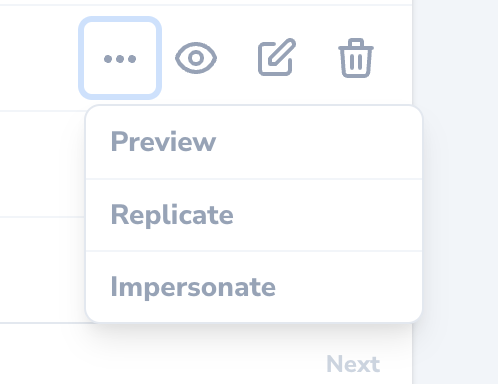
Once the `Impersonatable` trait has been added to your application's `User` model, an "Impersonate" action will be available via the inline action menu for the corresponding resource:
 ### Customizing Impersonation Authorization
By default, any user that has permission to view the Nova dashboard can impersonate any other user. However, you may customize who can impersonate other users and what users can be impersonated by defining `canImpersonate` and `canBeImpersonated` methods on your application's `Impersonatable` model:
```php app/Models/User.php theme={null}
use Illuminate\Support\Facades\Gate;
// ...
/**
* Determine if the user can impersonate another user.
*
* @return bool
*/
public function canImpersonate()
{
return Gate::forUser($this)->check('viewNova');
}
/**
* Determine if the user can be impersonated.
*
* @return bool
*/
public function canBeImpersonated()
{
return true;
}
```
## Inspecting Impersonation State
By resolving an implementation of the `Laravel\Nova\Contracts\ImpersonatesUsers` interface via Laravel's service container, you can inspect the current impersonation state of the application:
```php routes/web.php theme={null}
use App\Models\User;
use Illuminate\Http\Request;
use Illuminate\Support\Facades\Route;
use Laravel\Nova\Contracts\ImpersonatesUsers;
Route::get('/impersonation', function (Request $request, ImpersonatesUsers $impersonator) {
if ($impersonator->impersonating($request)) {
$impersonator->stopImpersonating($request, Auth::guard(), User::class);
}
});
```
## Impersonation Events
By default, you add additional customisation by using available events for Impersonations:
* `Laravel\Nova\Events\StartedImpersonating`
* `Laravel\Nova\Events\StoppedImpersonating`
For example, you may want to log impersonation events, which you can register listeners for in the `boot` method of your application's `AppServiceProvider` or `EventServiceProvider`:
```php app/Providers/EventServiceProvider.php {2-3,14-16,18-20} theme={null}
use Illuminate\Support\Facades\Event;
use Laravel\Nova\Events\StartedImpersonating;
use Laravel\Nova\Events\StoppedImpersonating;
// ...
/**
* Bootstrap any application services.
*/
public function boot(): void
{
parent::boot();
Event::listen(StartedImpersonating::class, function ($event) {
logger("User {$event->impersonator->name} started impersonating {$event->impersonated->name}");
});
Event::listen(StoppedImpersonating::class, function ($event) {
logger("User {$event->impersonator->name} stopped impersonating {$event->impersonated->name}");
});
}
```
### Customizing Impersonation Authorization
By default, any user that has permission to view the Nova dashboard can impersonate any other user. However, you may customize who can impersonate other users and what users can be impersonated by defining `canImpersonate` and `canBeImpersonated` methods on your application's `Impersonatable` model:
```php app/Models/User.php theme={null}
use Illuminate\Support\Facades\Gate;
// ...
/**
* Determine if the user can impersonate another user.
*
* @return bool
*/
public function canImpersonate()
{
return Gate::forUser($this)->check('viewNova');
}
/**
* Determine if the user can be impersonated.
*
* @return bool
*/
public function canBeImpersonated()
{
return true;
}
```
## Inspecting Impersonation State
By resolving an implementation of the `Laravel\Nova\Contracts\ImpersonatesUsers` interface via Laravel's service container, you can inspect the current impersonation state of the application:
```php routes/web.php theme={null}
use App\Models\User;
use Illuminate\Http\Request;
use Illuminate\Support\Facades\Route;
use Laravel\Nova\Contracts\ImpersonatesUsers;
Route::get('/impersonation', function (Request $request, ImpersonatesUsers $impersonator) {
if ($impersonator->impersonating($request)) {
$impersonator->stopImpersonating($request, Auth::guard(), User::class);
}
});
```
## Impersonation Events
By default, you add additional customisation by using available events for Impersonations:
* `Laravel\Nova\Events\StartedImpersonating`
* `Laravel\Nova\Events\StoppedImpersonating`
For example, you may want to log impersonation events, which you can register listeners for in the `boot` method of your application's `AppServiceProvider` or `EventServiceProvider`:
```php app/Providers/EventServiceProvider.php {2-3,14-16,18-20} theme={null}
use Illuminate\Support\Facades\Event;
use Laravel\Nova\Events\StartedImpersonating;
use Laravel\Nova\Events\StoppedImpersonating;
// ...
/**
* Bootstrap any application services.
*/
public function boot(): void
{
parent::boot();
Event::listen(StartedImpersonating::class, function ($event) {
logger("User {$event->impersonator->name} started impersonating {$event->impersonated->name}");
});
Event::listen(StoppedImpersonating::class, function ($event) {
logger("User {$event->impersonator->name} stopped impersonating {$event->impersonated->name}");
});
}
```