> ## Documentation Index
> Fetch the complete documentation index at: https://nova.laravel.com/docs/llms.txt
> Use this file to discover all available pages before exploring further.
# Registering Metrics
> Learn how to register metrics in Nova.
## Overview
Once you have defined a metric, you are ready to attach it to a resource. Each resource generated by Nova contains a `cards` method. To attach a metric to a resource, you should simply add it to the array of metrics / cards returned by this method:
```php theme={null}
use App\Nova\Metrics\UsersPerDay;
use Laravel\Nova\Http\Requests\NovaRequest;
/**
* Get the cards available for the resource.
*
* @param \Laravel\Nova\Http\Requests\NovaRequest $request
* @return array
*/
public function cards(NovaRequest $request)
{
return [
new UsersPerDay
];
}
```
Alternatively, you may use the `make` method to instantiate your metric:
```php theme={null}
use App\Nova\Metrics\UsersPerDay;
use Laravel\Nova\Http\Requests\NovaRequest;
/**
* Get the cards available for the resource.
*
* @param \Laravel\Nova\Http\Requests\NovaRequest $request
* @return array
*/
public function cards(NovaRequest $request)
{
return [
UsersPerDay::make()
];
}
```
Any arguments passed to the `make` method will be passed to the constructor of your metric.
### Detail Metrics
In addition to placing metrics on the resource index page, you may also attach a metric to the resource detail page. For example, if you are building a podcasting application, you may wish to display the total number of podcasts created by a specific user over time. To instruct a metric to be displayed on the detail page instead of the index page, invoke the `onlyOnDetail` method when registering your metric:
```php theme={null}
/**
* Get the cards available for the request.
*
* @param \Laravel\Nova\Http\Requests\NovaRequest $request
* @return array
*/
public function cards(NovaRequest $request)
{
return [
(new Metrics\PodcastCount)->onlyOnDetail(),
];
}
```
Of course, you will need to modify your metric's query to only gather metric data on the resource for which it is currently being displayed. To accomplish this, your metric's `calculate` method may access the `resourceId` property on the incoming `$request`:
```php theme={null}
use App\Models\Podcast;
return $this->count($request, Podcast::where('user_id', $request->resourceId));
```
### Dashboard Metrics
You are also free to add metrics to your primary Nova "dashboard", which is the default page that Nova displays after login. By default, this page displays some helpful links to the Nova documentation via the built-in `Help` card. To add a metric to your dashboard, add the metric to the array of cards returned by the `cards` method of your `app/Nova/Dashboards/Main` class:
```php theme={null}
use App\Nova\Metrics\NewUsers;
/**
* Get the cards that should be displayed on the Nova dashboard.
*
* @return array
*/
protected function cards()
{
return [
new NewUsers,
];
}
```
## Authorization
If you would like to only expose a given metric to certain users, you may invoke the `canSee` method when registering your metric. The `canSee` method accepts a closure which should return `true` or `false`. The closure will receive the incoming HTTP request:
```php theme={null}
use App\Models\User;
use Laravel\Nova\Http\Requests\NovaRequest;
/**
* Get the cards available for the resource.
*
* @param \Laravel\Nova\Http\Requests\NovaRequest $request
* @return array
*/
public function cards(NovaRequest $request)
{
return [
(new Metrics\UsersPerDay)->canSee(function ($request) {
return $request->user()->can('viewUsersPerDay', User::class);
}),
];
}
```
In the example above, we are using Laravel's `Authorizable` trait's `can` method on our `User` model to determine if the authorized user is authorized for the `viewUsersPerDay` action. However, since proxying to authorization policy methods is a common use-case for `canSee`, you may use the `canSeeWhen` method to achieve the same behavior. The `canSeeWhen` method has the same method signature as the `Illuminate\Foundation\Auth\Access\Authorizable` trait's `can` method:
```php theme={null}
return [
(new Metrics\UsersPerDay)->canSeeWhen(
'viewUsersPerDay', User::class
),
];
```
## Default Metric Range
You may wish to initially load a certain metric range by default. You can pass the range's array key to the `defaultRange` method of the metric to accomplish this:
```php theme={null}
use App\Nova\Metrics\NewUsers;
/**
* Get the cards that should be displayed on the Nova dashboard.
*
* @return array
*/
protected function cards()
{
return [
NewUsers::make()->defaultRange('YTD'),
];
}
```
## Metric Sizes
By default, metrics take up one-third of the Nova content area. However, you are free to make them larger. To accomplish this, call the `width` method when registering the metric:
```php theme={null}
/**
* Get the cards available for the request.
*
* @param \Laravel\Nova\Http\Requests\NovaRequest $request
* @return array
*/
public function cards(NovaRequest $request)
{
return [
// Two-thirds of the content area...
(new Metrics\UsersPerDay)->width('2/3'),
// Full width...
(new Metrics\UsersPerDay)->width('full'),
];
}
```
When the metric width is set to `full`, the height of the card will become dynamic. You may explicitly define this behaviour by calling the `fixedHeight` or `dynamicHeight` methods:
```php theme={null}
/**
* Get the cards available for the request.
*
* @param \Laravel\Nova\Http\Requests\NovaRequest $request
* @return array
*/
public function cards(NovaRequest $request)
{
return [
(new Metrics\UsersPerDay)->width('full')->fixedHeight(),
(new Metrics\UsersPerDay)->width('full')->dynamicHeight(),
];
}
```
## Metric Help Text / Tooltips
Sometimes a metric needs to offer the user more context about how the value is calculated or other details related to the metric's value. To provide this context, Nova allows you to define a help text "tooltip", which can be registered similarly to [Field Help Text](./../resources/fields#field-help-text):
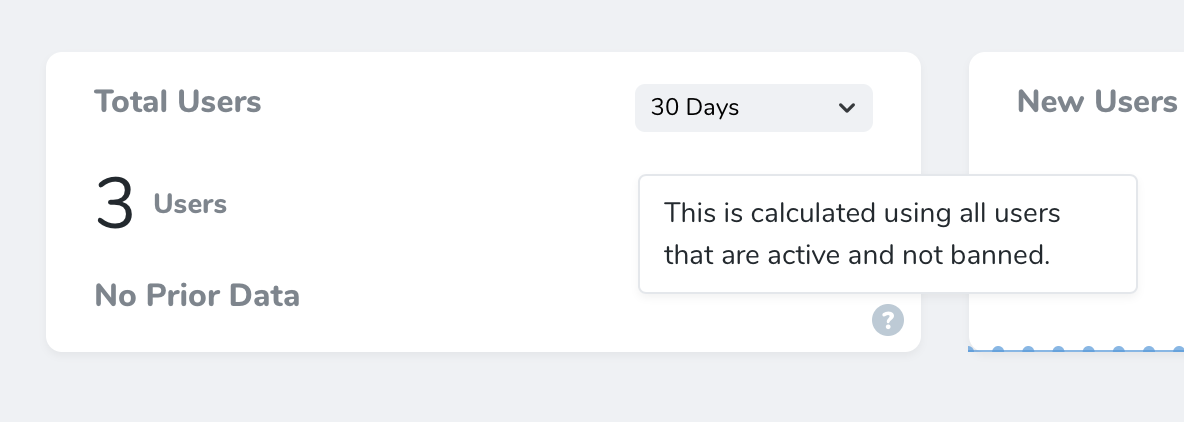 To enable the tooltip, invoke the `help` method while registering your metric. The `help` method receives the help text as its only argument:
```php theme={null}
/**
* Get the cards available for the request.
*
* @param \Laravel\Nova\Http\Requests\NovaRequest $request
* @return array
*/
public function cards(NovaRequest $request)
{
return [
(new TotalUsers)
->help('This is calculated using all users that are active and not banned.'),
];
}
```
You may also use HTML when defining your help text. For example, you may pass a rendered Blade template to the `help` method:
```php theme={null}
(new TotalUsers)
->help(view('nova.metrics.total-users.tooltip')->render()),
```
## Refreshing Metrics
Laravel Nova will automatically fetch updated results (without requiring the user to refresh the page) for metrics attached to a resource based on following events:
| Event | Behaviour |
| :---------------- | :---------------------------------------------------------------------------------------------------------------------------- |
| Resource Deleted | Automatic Update |
| Resource Restored | Automatic Update |
| Action Executed | [Only update if the metric's `refreshWhenActionsRun` method is invoked during registration](#refresh-after-actions) |
| Filter Change | [Only update if the metric's `refreshWhenFiltersChange` method is invoked during registration](#refresh-after-filter-changes) |
### Refresh After Actions
By default, Nova does not automatically update metric results after an action is executed without the user manually refreshing the page; however, you may indicate that metrics should automatically refresh after actions have executed by invoking the `refreshWhenActionsRun` method when registering your metric:
```php theme={null}
public function cards(NovaRequest $request)
{
return [
TotalUsers::make()->refreshWhenActionsRun(),
];
}
```
### Refresh After Filter Changes
Likewise, Laravel Nova will only automatically update a metric's value when a page's selected filters change if the metric's `refreshWhenFiltersChange` method is invoked when the metric is registered:
```php theme={null}
public function cards(NovaRequest $request)
{
return [
TotalUsers::make()->refreshWhenFiltersChange(),
];
}
```
To enable the tooltip, invoke the `help` method while registering your metric. The `help` method receives the help text as its only argument:
```php theme={null}
/**
* Get the cards available for the request.
*
* @param \Laravel\Nova\Http\Requests\NovaRequest $request
* @return array
*/
public function cards(NovaRequest $request)
{
return [
(new TotalUsers)
->help('This is calculated using all users that are active and not banned.'),
];
}
```
You may also use HTML when defining your help text. For example, you may pass a rendered Blade template to the `help` method:
```php theme={null}
(new TotalUsers)
->help(view('nova.metrics.total-users.tooltip')->render()),
```
## Refreshing Metrics
Laravel Nova will automatically fetch updated results (without requiring the user to refresh the page) for metrics attached to a resource based on following events:
| Event | Behaviour |
| :---------------- | :---------------------------------------------------------------------------------------------------------------------------- |
| Resource Deleted | Automatic Update |
| Resource Restored | Automatic Update |
| Action Executed | [Only update if the metric's `refreshWhenActionsRun` method is invoked during registration](#refresh-after-actions) |
| Filter Change | [Only update if the metric's `refreshWhenFiltersChange` method is invoked during registration](#refresh-after-filter-changes) |
### Refresh After Actions
By default, Nova does not automatically update metric results after an action is executed without the user manually refreshing the page; however, you may indicate that metrics should automatically refresh after actions have executed by invoking the `refreshWhenActionsRun` method when registering your metric:
```php theme={null}
public function cards(NovaRequest $request)
{
return [
TotalUsers::make()->refreshWhenActionsRun(),
];
}
```
### Refresh After Filter Changes
Likewise, Laravel Nova will only automatically update a metric's value when a page's selected filters change if the metric's `refreshWhenFiltersChange` method is invoked when the metric is registered:
```php theme={null}
public function cards(NovaRequest $request)
{
return [
TotalUsers::make()->refreshWhenFiltersChange(),
];
}
```