> ## Documentation Index
> Fetch the complete documentation index at: https://nova.laravel.com/docs/llms.txt
> Use this file to discover all available pages before exploring further.
# Defining Filters
> Nova filters are simple classes that allow you to scope your Nova index queries with custom conditions.
Nova filters are simple classes that allow you to scope your Nova index queries with custom conditions.
Before creating your own filters, you may want to check out [filterable fields](./../resources/fields#filterable-fields). Filterable fields can solve the filtering needs of most Nova installations without the need to write custom code.
## Select Filters
The most common type of Nova filter is the "select" filter, which allows the user to select a filter option from a drop-down selection menu:
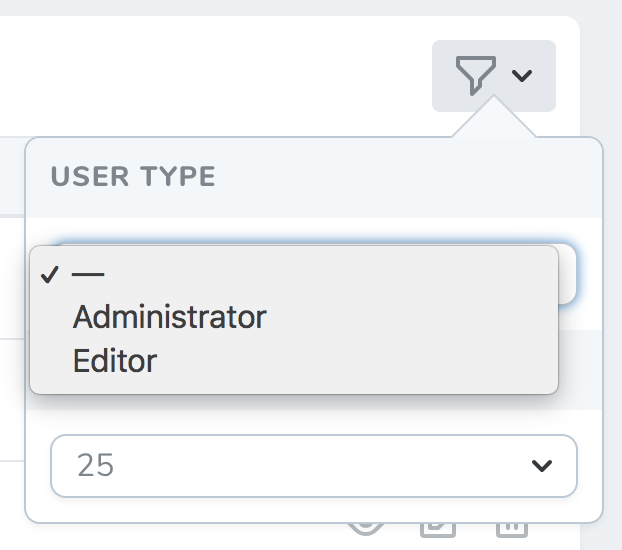 You may generate a select filter using the `nova:filter` Artisan command. By default, Nova will place newly generated filters in the `app/Nova/Filters` directory:
```bash theme={null}
php artisan nova:filter UserType
```
Each select filter generated by Nova contains two methods: `apply` and `options`. The `apply` method is responsible for modifying the underlying Eloquent query to achieve the desired filter state, while the `options` method defines the "values" the filter may have. Let's take a look at an example `UserType` filter:
```php theme={null}
where('type', $value);
}
/**
* Get the filter's available options.
*
* @param \Laravel\Nova\Http\Requests\NovaRequest $request
* @return array
*/
public function options(NovaRequest $request)
{
return [
'Administrator' => 'admin',
'Editor' => 'editor',
];
}
}
```
The `options` method should return an array of keys and values. The array's keys will be used as the "human-friendly" text that will be displayed in the Nova UI, while the array's values will be passed into the `apply` method as the `$value` argument. This filter defines two possible values: `admin` and `editor`.
As you can see in the example above, you may leverage the incoming `$value` to modify your query, and the `apply` method should return the modified query instance.
## Boolean Filters
Nova also supports "boolean" filters, which allow the user to select multiple filter options via a list of check-boxes:
You may generate a select filter using the `nova:filter` Artisan command. By default, Nova will place newly generated filters in the `app/Nova/Filters` directory:
```bash theme={null}
php artisan nova:filter UserType
```
Each select filter generated by Nova contains two methods: `apply` and `options`. The `apply` method is responsible for modifying the underlying Eloquent query to achieve the desired filter state, while the `options` method defines the "values" the filter may have. Let's take a look at an example `UserType` filter:
```php theme={null}
where('type', $value);
}
/**
* Get the filter's available options.
*
* @param \Laravel\Nova\Http\Requests\NovaRequest $request
* @return array
*/
public function options(NovaRequest $request)
{
return [
'Administrator' => 'admin',
'Editor' => 'editor',
];
}
}
```
The `options` method should return an array of keys and values. The array's keys will be used as the "human-friendly" text that will be displayed in the Nova UI, while the array's values will be passed into the `apply` method as the `$value` argument. This filter defines two possible values: `admin` and `editor`.
As you can see in the example above, you may leverage the incoming `$value` to modify your query, and the `apply` method should return the modified query instance.
## Boolean Filters
Nova also supports "boolean" filters, which allow the user to select multiple filter options via a list of check-boxes:
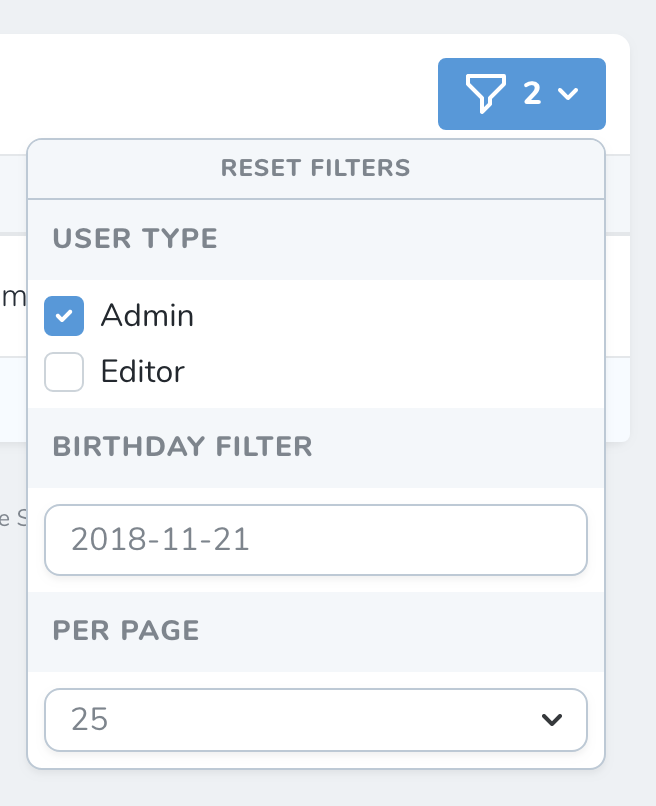 You may generate a boolean filter using the `nova:filter --boolean` Artisan command. By default, Nova will place newly generated filters in the `app/Nova/Filters` directory:
```bash theme={null}
php artisan nova:filter UserType --boolean
```
Each boolean filter generated by Nova contains two methods: `apply` and `options`. The `apply` method is responsible for modifying the Eloquent query to achieve the desired filter state, while the options method defines the "values" the filter may have.
When building boolean filters, the `$value` argument passed to the `apply` method is an associative array containing the boolean value of each of your filter's options. Let's take a look at an example `UserType` filter:
```php theme={null}
true / false, 'editor' => true / false]
return $query->where('is_admin', $value['admin'])
->where('is_editor', $value['editor']);
}
/**
* Get the filter's available options.
*
* @param \Laravel\Nova\Http\Requests\NovaRequest $request
* @return array
*/
public function options(NovaRequest $request)
{
return [
'Administrator' => 'admin',
'Editor' => 'editor',
];
}
}
```
The `options` method should return an array of keys and values. The array's keys will be used as the "human-friendly" text that will be displayed in the Nova UI. The array's values will be passed into the `apply` method as the `$value` argument. This filter defines two possible values: `admin` and `editor`.
As you can see in the example above, you may leverage the incoming `$value` to modify your query. The `apply` method should return the modified query instance.
## Date Filters
Nova also supports "date" filters, which allow the user to select the filter's value via a date selection calendar:
You may generate a boolean filter using the `nova:filter --boolean` Artisan command. By default, Nova will place newly generated filters in the `app/Nova/Filters` directory:
```bash theme={null}
php artisan nova:filter UserType --boolean
```
Each boolean filter generated by Nova contains two methods: `apply` and `options`. The `apply` method is responsible for modifying the Eloquent query to achieve the desired filter state, while the options method defines the "values" the filter may have.
When building boolean filters, the `$value` argument passed to the `apply` method is an associative array containing the boolean value of each of your filter's options. Let's take a look at an example `UserType` filter:
```php theme={null}
true / false, 'editor' => true / false]
return $query->where('is_admin', $value['admin'])
->where('is_editor', $value['editor']);
}
/**
* Get the filter's available options.
*
* @param \Laravel\Nova\Http\Requests\NovaRequest $request
* @return array
*/
public function options(NovaRequest $request)
{
return [
'Administrator' => 'admin',
'Editor' => 'editor',
];
}
}
```
The `options` method should return an array of keys and values. The array's keys will be used as the "human-friendly" text that will be displayed in the Nova UI. The array's values will be passed into the `apply` method as the `$value` argument. This filter defines two possible values: `admin` and `editor`.
As you can see in the example above, you may leverage the incoming `$value` to modify your query. The `apply` method should return the modified query instance.
## Date Filters
Nova also supports "date" filters, which allow the user to select the filter's value via a date selection calendar:
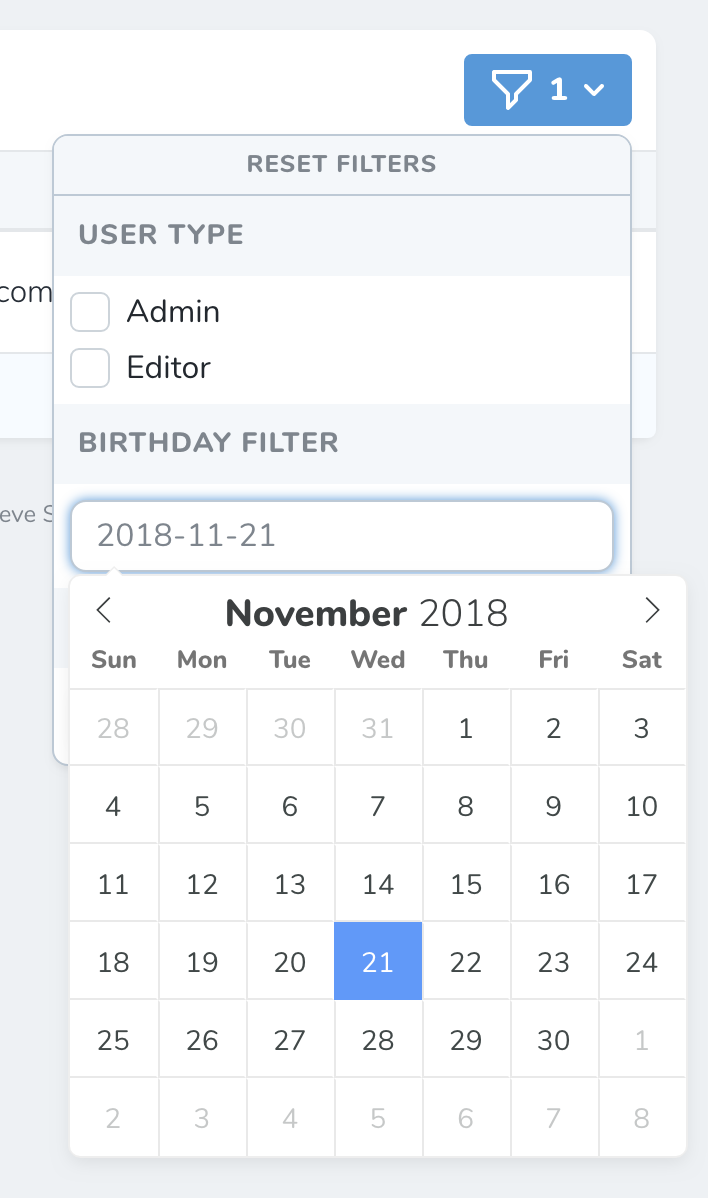 You may generate a date filter using the `nova:filter --date` Artisan command. By default, Nova will place newly generated filters in the `app/Nova/Filters` directory:
```bash theme={null}
php artisan nova:filter BirthdayFilter --date
```
Each date filter generated by Nova contains one method: `apply`. The `apply` method is responsible for modifying the query to achieve the desired filter state.
When building date filters, the `$value` argument passed to the `apply` method is the string representation of the selected date. Let's take a look at an example `BirthdayFilter` filter:
```php theme={null}
where('birthday', '<=', Carbon::parse($value));
}
}
```
As you can see in the example above, you may leverage the incoming `$value` to modify your query. The `apply` method should return the modified query instance.
## Filter Titles
If you would like to change the filter title that is displayed in Nova's filter selection menu, you may define a `name` property on the filter class:
```php theme={null}
/**
* The displayable name of the filter.
*
* @var string
*/
public $name = 'Filter Title';
```
If the name of your filter needs to be dynamic, you should create a `name` method on the filter class:
```php theme={null}
/**
* Get the displayable name of the filter.
*
* @return string
*/
public function name()
{
return 'Filter By '.$this->customProperty;
}
```
## Filter Default Values
If you would like to set the default value of a filter, you may define a `default` method on the filter class:
```php theme={null}
/**
* The default value of the filter.
*
* @var string
*/
public function default()
{
return true;
}
```
## Dynamic Filters
There may be times when you want to create a dynamic filter which filters on columns that are determined at runtime, allowing you to reuse a filter class across multiple different resources and fields.
To accomplish this, you could pass the name of the filterable column into the filter's constructor. In addition to passing the column name that we want to filter on in the constructor, we'll also need to override the `key` method of the filter so that Nova can uniquely identify this instance of the filter if multiple instances of this filter exist on the page. Let's take a look at an example `TimestampFilter` filter:
```php theme={null}
column = $column;
}
/**
* Apply the filter to the given query.
*
* @param \Laravel\Nova\Http\Requests\NovaRequest $request
* @param \Illuminate\Database\Eloquent\Builder $query
* @param mixed $value
* @return \Illuminate\Database\Eloquent\Builder
*/
public function apply(NovaRequest $request, $query, $value)
{
return $query->where($this->column, '<=', Carbon::parse($value));
}
/**
* Get the key for the filter.
*
* @return string
*/
public function key()
{
return 'timestamp_'.$this->column;
}
}
```
Then, as discussed, you should pass the name of the column you wish to filter on:
```php theme={null}
/**
* Get the filters available for the resource.
*
* @param \Laravel\Nova\Http\Requests\NovaRequest $request
* @return array
*/
public function filters(NovaRequest $request)
{
return [
new Filters\TimestampFilter('created_at'),
new Filters\TimestampFilter('deleted_at'),
];
}
```
You may generate a date filter using the `nova:filter --date` Artisan command. By default, Nova will place newly generated filters in the `app/Nova/Filters` directory:
```bash theme={null}
php artisan nova:filter BirthdayFilter --date
```
Each date filter generated by Nova contains one method: `apply`. The `apply` method is responsible for modifying the query to achieve the desired filter state.
When building date filters, the `$value` argument passed to the `apply` method is the string representation of the selected date. Let's take a look at an example `BirthdayFilter` filter:
```php theme={null}
where('birthday', '<=', Carbon::parse($value));
}
}
```
As you can see in the example above, you may leverage the incoming `$value` to modify your query. The `apply` method should return the modified query instance.
## Filter Titles
If you would like to change the filter title that is displayed in Nova's filter selection menu, you may define a `name` property on the filter class:
```php theme={null}
/**
* The displayable name of the filter.
*
* @var string
*/
public $name = 'Filter Title';
```
If the name of your filter needs to be dynamic, you should create a `name` method on the filter class:
```php theme={null}
/**
* Get the displayable name of the filter.
*
* @return string
*/
public function name()
{
return 'Filter By '.$this->customProperty;
}
```
## Filter Default Values
If you would like to set the default value of a filter, you may define a `default` method on the filter class:
```php theme={null}
/**
* The default value of the filter.
*
* @var string
*/
public function default()
{
return true;
}
```
## Dynamic Filters
There may be times when you want to create a dynamic filter which filters on columns that are determined at runtime, allowing you to reuse a filter class across multiple different resources and fields.
To accomplish this, you could pass the name of the filterable column into the filter's constructor. In addition to passing the column name that we want to filter on in the constructor, we'll also need to override the `key` method of the filter so that Nova can uniquely identify this instance of the filter if multiple instances of this filter exist on the page. Let's take a look at an example `TimestampFilter` filter:
```php theme={null}
column = $column;
}
/**
* Apply the filter to the given query.
*
* @param \Laravel\Nova\Http\Requests\NovaRequest $request
* @param \Illuminate\Database\Eloquent\Builder $query
* @param mixed $value
* @return \Illuminate\Database\Eloquent\Builder
*/
public function apply(NovaRequest $request, $query, $value)
{
return $query->where($this->column, '<=', Carbon::parse($value));
}
/**
* Get the key for the filter.
*
* @return string
*/
public function key()
{
return 'timestamp_'.$this->column;
}
}
```
Then, as discussed, you should pass the name of the column you wish to filter on:
```php theme={null}
/**
* Get the filters available for the resource.
*
* @param \Laravel\Nova\Http\Requests\NovaRequest $request
* @return array
*/
public function filters(NovaRequest $request)
{
return [
new Filters\TimestampFilter('created_at'),
new Filters\TimestampFilter('deleted_at'),
];
}
```